
Top 8 HRMS Software Solutions for Mid-Market Tech Companies in 2026
Struggling to find the right HRMS for your tech company in 2026? You are not alone. Most HR software falls into one of two camps: tools built for small teams that you will outgrow in 18 months, or enterprise suites that take a year to implement and require a full-time admin just to run. Neither fits a company in the 100 to 1,000 employee range trying to move fast without breaking things.
The options have also never been more overwhelming. AI-native features are showing up across every platform. ATS integrations have gotten deeper. Global payroll is now expected rather than exceptional. And with so many vendors pitching the same buzzwords, it is genuinely hard to know who is actually built for your stage versus who is just marketing to you.
This guide is here to help. We reviewed eight of the most commonly evaluated HRMS platforms for scaling tech companies and broke down what each one actually does well, where it falls short, and who it is really built for.
Insights

Maiia
What Fast-Growing Tech Companies Actually Need in an HRMS
Before diving into the tools, it is worth getting clear on what companies at this stage need that others do not.
- Core modules that cannot be missing. Payroll accuracy, structured onboarding, performance management, and compliance across multiple jurisdictions are non-negotiable. If a platform is weak in any of these areas, it will create more work than it saves.
- Integrations with the tech stack you already use. Most HR tools integrate with Slack. Fewer integrate cleanly with Jira, GitHub, or your existing ATS. The hiring-to-onboarding handoff is a critical workflow and your HRMS needs to connect to your recruiting stack without manual exports in the middle.
- Scalability without re-implementation. The worst outcome is outgrowing your HRMS at 400 employees and having to migrate everything again. The best platforms let you activate new modules as you grow rather than forcing a full platform switch.
- Configurability over complexity. There is an important distinction between a platform that is powerful because it is configurable and one that is powerful because it is complicated. Lean People Ops teams, which are common at this stage, need the former.
The Best HRMS Solutions for Scaling Tech Teams in 2026
1. Keka
Best for:
Keka is a complete, all-in-one HRMS and PeopleOps platform built for organizations that want more from their HR function than just administration. It automates the full spectrum of people operations from hiring, onboarding, and payroll to time tracking, performance management, and project resourcing.
AI is built deep into the platform and woven into every layer of the product. This gives HR professionals workforce interaction intelligence. That’s real-time insights into how people are hired, perform, how they grow, and where they disengage so every decision is informed, not instinctive.
Keka's modules are interconnected so data moves across the employee lifecycle without manual intervention. Over 10,000 organizations use it, including global enterprises. Setup is straightforward, and the interface is designed to require minimal training; a deliberate departure from the implementation-heavy, hard-to-navigate systems that have historically defined the HRMS category.

Keka HRMS Dashboard
Key features:
- Multi paygroup, global payroll-synced with time tracking and attendance and expense
- AI-powered ATS that automates requisition management, job board sourcing, resume parsing, and offer management and onboarding.
- Performance management with built-in LMS
- Time and attendance with 200+ biometric integrations, remote clock-in, geofencing attendance and more
- HR analytics that surface workforce insights across hiring, attendance, payroll, performance, and projects with role-based access and real-time data sync across the entire employee lifecycle.
Pricing: Three tiers available: Foundation, Strength, and Growth. Pricing is not publicly listed for the US market and requires contacting Keka directly for a quote. A free trial is available across all plans.
Limitations: Customer support response times have been flagged in user reviews as an area for improvement. The integration marketplace, while growing, is not yet as extensive as some competitors.
2. Rippling
Best for: Tech companies that want HR, IT, and finance unified in a single platform with deep workflow automation.
Rippling is built around one idea: HR, IT, and finance all touch the same employee data, so why keep them in separate systems? A single onboarding trigger can provision a laptop, add someone to Slack, enroll them in benefits, and run payroll simultaneously.
The caveat is that Rippling's breadth comes with real complexity. Without someone who knows the platform well managing setup and ongoing configuration, it can feel overwhelming, particularly around security permissions and access management. Costs also accumulate quickly as you activate modules.
Rippling dashboard

Key features:
- Unified HR/IT/finance platform
- Integrated global payroll, benefits administration
- Device and app provisioning
- Workflow automation
- 500+ integrations
- Visual hiring pipeline with candidate database.
Pricing: Modular, starting around $8 per employee per month for core HR. Full-suite pricing requires a custom quote.
Limitations: Can overwhelm lean People Ops teams. Implementation requires meaningful upfront investment. Not the right choice if you want a focused HRMS without the IT management layer.
3. BambooHR
Best for: Growing companies that want a clean, HR-first platform without unnecessary complexity.
BambooHR is the safe pair of hands in this list. It does not try to manage your laptops or run your finance team. It focuses on doing HR well, with a user experience that both HR administrators and employees actually enjoy using. The onboarding flows are among the cleanest in the market, reporting is solid, and the interface has stayed consistently accessible through product iterations.
For US-based tech companies that do not need heavy global payroll capabilities and want to get up and running quickly, BambooHR is a strong default.
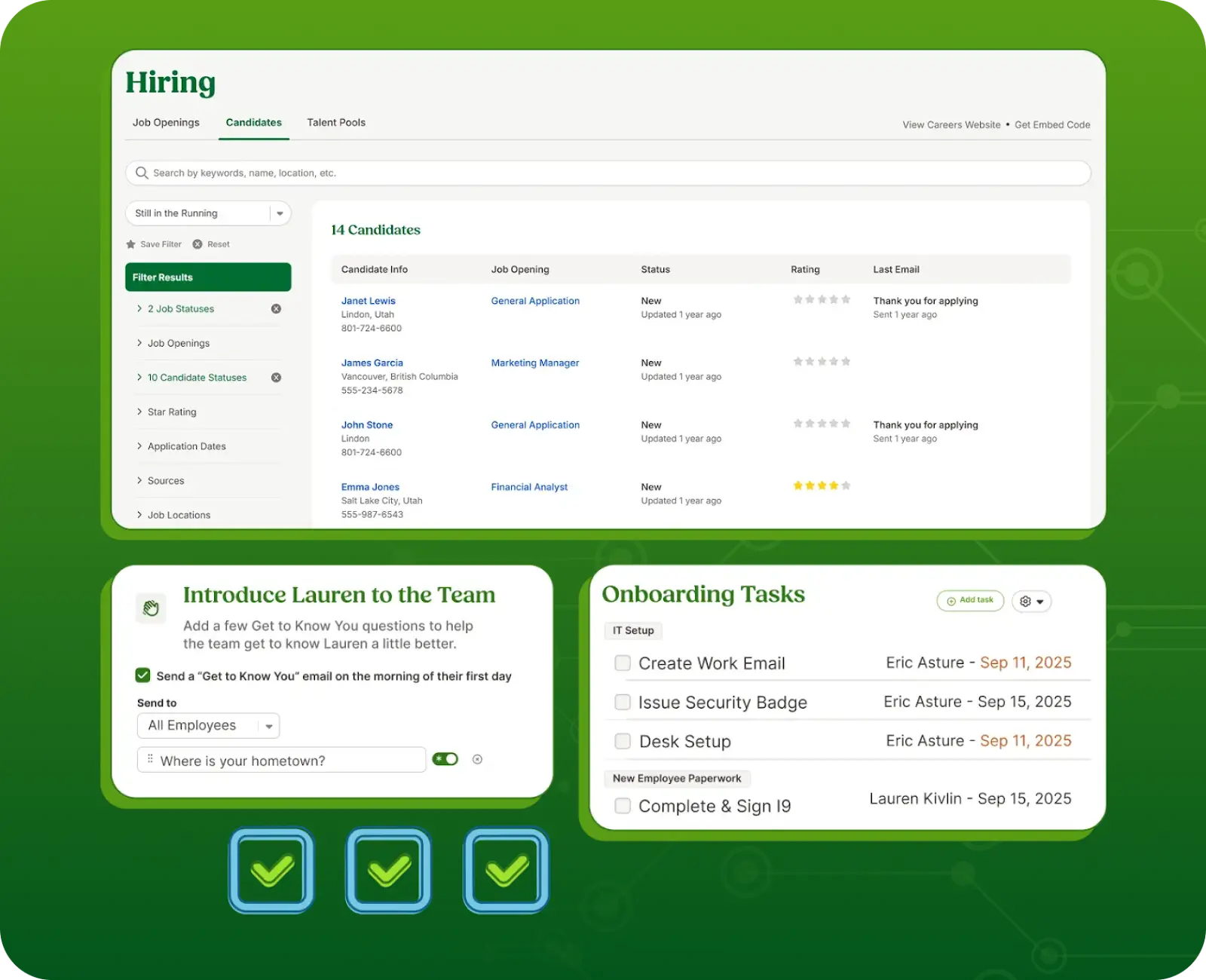
Bamboo HR
Key features:
- Applicant Tracking
- Onboarding Workflows
- Time-Off Management
- Performance Reviews
- Compensation Management
- Employee Records
- Mobile App.
Pricing: Starts around $6 to $9 per employee per month depending on plan.
Limitations: Global payroll is limited, making it a weak fit for companies with significant multi-country operations. Power users and fast-scaling companies may eventually find the customization ceiling frustrating.
4. Workday
Best for: Companies at the upper end of the scale (500 to 1,000 employees) preparing for enterprise-level operations.
Workday is the enterprise benchmark. If you are approaching 600 to 1,000 employees, operating across multiple countries, and anticipate significant headcount growth, Workday gives you a platform that will not be outgrown. The depth of its workforce planning, compensation modeling, and analytics capabilities is in a different league from most other tools.
That said, Workday comes with enterprise trade-offs including lengthy implementation timelines, high total cost of ownership, and a configuration complexity that requires dedicated expertise. It is best suited for companies with a real People Ops function and a clear enterprise trajectory.
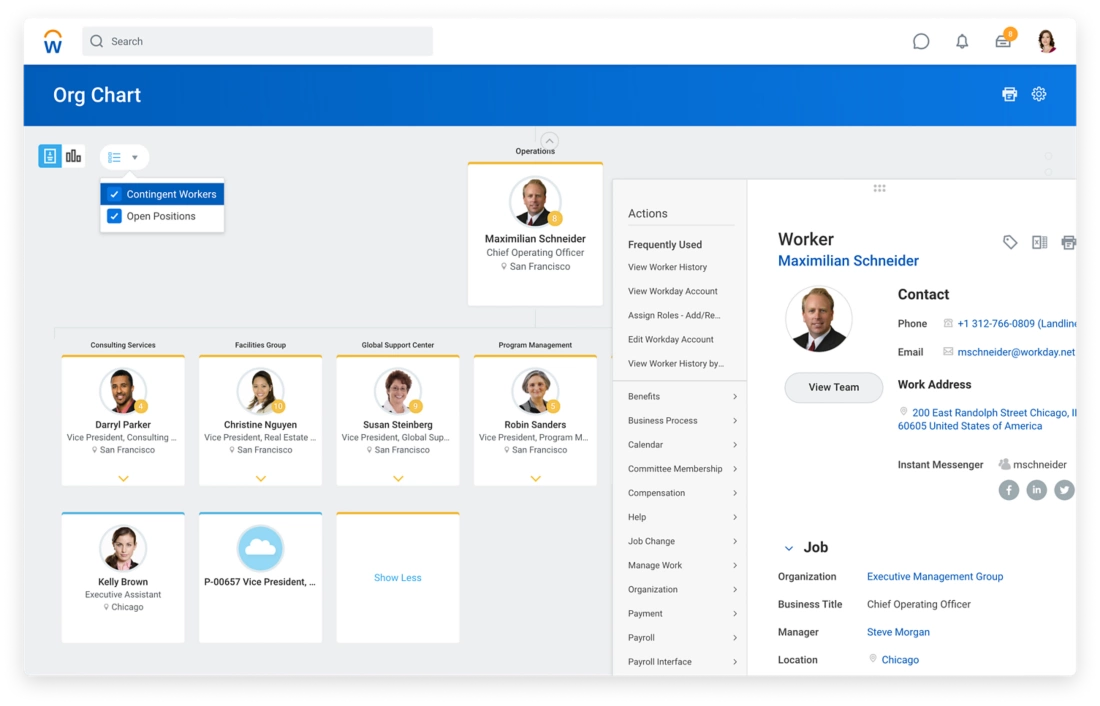
Workday
Key features:
- Full Hcm Suite
- Workforce Planning
- Advanced Analytics
- Global Payroll
- Talent Management
- Learning And Development
- Compensation Modeling
Pricing: Custom enterprise pricing; typically starts in the tens of thousands annually.
Limitations: Expensive relative to other options in this list. Implementation is a multi-month commitment. Generally not appropriate for companies below 500 employees.
5. HiBob
Best for: Multi-national, culture-focused tech companies that prioritize employee experience alongside operational rigor.
HiBob (branded as "Bob") has carved out a distinctive position by combining serious HR capability with a platform that employees actually engage with. Kudos features, announcements, and pulse surveys sit alongside robust performance management, compensation tools, and an integration marketplace with 100+ connectors.
The 2024 launch of Bob Hiring (a native ATS) and Bob Learning (a full LMS) means the platform now covers the complete employee lifecycle. One area to flag: some users have raised concerns about data access following the Pento payroll merger, which is worth raising in vendor conversations if data portability matters to your team.
Hibob Dashboard

Key features:
- Core Hris
- Native ATS (Bob Hiring)
- Lms (Bob Learning)
- Performance Management
- 360-Degree Feedback
- Compensation Management
- 100+ Integrations
- Employee Engagement Tools.
Pricing: Custom pricing; typically in the range of $6 to $12 per employee per month.
Limitations: Benefits module has received mixed reviews. Some users cite limited advanced configuration flexibility and occasional org chart usability issues at larger headcounts.
6. Deel
Best for: Tech companies with significant contractor workforces or employees distributed across multiple countries.
If your team spans 10+ countries, or you are heavily reliant on contractors and freelancers, Deel's value proposition is hard to match. It was purpose-built for global employment complexity: Employer of Record (EOR) services, contractor management, local compliance in 150+ countries, and multi-currency payroll in one platform.
For tech companies that hire globally but want to avoid establishing legal entities in every country, Deel's EOR model is genuinely useful. The HRIS features have matured considerably, though the platform remains strongest on the payroll and compliance side.

Deel
Key Features:
- Global Payroll
- Employer Of Record (Eor)
- Contractor Management
- Local Tax Compliance In 150+ Countries
- Multi-Currency Payments
- Benefits Administration
- Expense Reimbursement
Pricing: EOR starts around $599/month per employee. Contractor management from $49/month per contractor.
Limitations: More expensive per employee than pure HRIS tools. Performance management and engagement features are not as mature as a dedicated HRMS.
7. Lattice
Best for: Tech companies that want best-in-class performance management and are willing to run a two-platform model.
Lattice occupies a specific and valuable niche. It is the performance management platform of choice for a large segment of the tech world, with OKR-based goal-setting, 1:1 tooling, career development frameworks, engagement surveys, and compensation management all tightly integrated. For engineering-led companies where performance culture is a strategic priority, the depth here is hard to match.
The important caveat is that Lattice is not a full HRMS. Most companies using Lattice pair it with a core HR system for payroll, onboarding, and employee records.

Lattice
Key features
- Okr/Goal Management
- 1:1 Meeting Tools
- Performance Reviews
- Engagement Surveys
- Career Development Frameworks
- Compensation Management
- Hris Integrations.
Pricing: Modular; performance management starts around $11 per person per month.
Limitations: Not a standalone HRMS and requires a core HR system. Pricing increases as you add modules, and some advanced automation features are gated to higher tiers.
8. Personio
Best for: European tech companies in the 100 to 1,000 employee range that need strong GDPR compliance and local HR law support.
Personio has become the dominant HRMS for companies in the DACH region (Germany, Austria, Switzerland), the UK, the Netherlands, and Spain. Its compliance credentials are genuine: GDPR-native design, EU data residency, and built-in support for local HR regulations are meaningful differentiators that other platforms cannot replicate with compliance add-ons.
Beyond compliance, Personio handles the full employee lifecycle including hiring, onboarding, absence management, and multi-country payroll integration. That said, the built-in ATS draws mixed reviews from recruiting teams at volume and automation capabilities lag behind some competitors.

Personio
Key features:
- Gdpr-Native Design
- Eu Data Residency
- Full Employee Lifecycle Management
- Multi-Country Payroll Integration
- Document Management With E-Signatures
- Absence Management
- Compliance Workflows
Pricing: Starts around €5 per employee per month for core HR; full suite typically €8 to €15 per employee.
Limitations: ATS is functional but consistently rated below dedicated recruiting tools. Automation capabilities are more limited than some alternatives. US expansion support is limited.
How to Choose the Right HRMS for Your Stage?
Picking the right HRMS is not just about features. It is about finding a platform that fits where your company is today and can grow with you. Here is a practical checklist to work through before making a decision.
Company stage and size
- How many employees do you have today, and where do you expect to be in 2 to 3 years?
- Do you have a dedicated People Ops or HR function, or is HR still handled by generalists or founders?
- Are you pre-IPO or preparing for rapid headcount growth? Some platforms handle scale better than others.
Geography and compliance
- Do you employ people in multiple countries, or is your team primarily in one region?
- Do you need local payroll compliance built in, or can you handle that through integrations?
- If you are based in Europe, is GDPR-native data residency a hard requirement?
Your existing tech stack
- Which tools does your team already use daily (Slack, Jira, GitHub, etc.)?
- Do you have an existing ATS you want to keep, or are you open to switching?
- How important is native integration vs. API-based connection for your workflow?
Core feature priorities
- Is payroll a must-have within the HRMS, or are you comfortable connecting to a separate payroll tool?
- How important is performance management depth, such as OKRs, continuous feedback, and 360 reviews?
- Do you need a built-in LMS for employee development, or is that handled elsewhere?
Team capacity for implementation
- How much internal bandwidth do you have to manage onboarding and configuration?
- Can you support a multi-month rollout, or do you need something up and running quickly?
- Who will own the platform day-to-day once it is live?
Budget and pricing model
- Are you looking for flat-rate pricing or per-employee-per-month?
- How does cost change as you grow from 200 to 500 to 1,000 employees?
- What is included in the base plan vs. what requires a paid add-on?
Questions to ask any vendor before signing
- What does implementation actually look like and what is the realistic timeline?
- Which integrations are native, and which require a third-party connector?
- What does post-go-live support look like? Dedicated CSM, ticketing, or community forum?
- Can you demo the product against our specific use cases rather than a scripted walkthrough?
- What happens to our data if we decide to leave?
Final Words
Choosing an HRMS is not a one-size-fits-all decision. The platforms in this list are all capable tools, but they serve different needs, different team sizes, and different levels of HR maturity. The right choice comes down to where your company is today, where it is heading in the next two to three years, and how much operational complexity you are ready to take on.
Start with the problems you actually have right now, not the ones you might have at triple the headcount. A platform you can implement, use, and grow into is worth more than one that looks impressive in a demo but sits half-configured six months after launch.
Whatever you choose, treat the vendor evaluation process seriously. Ask for a demo using your actual workflows, get pricing at your projected headcount, and talk to customers at a similar stage before signing anything.
Frequently Asked Questions
What is an HRMS and how is it different from an HRIS or HCM?
These terms are often used interchangeably but there are subtle differences. An HRIS (Human Resource Information System) is primarily a data management tool covering employee records, compliance, and reporting. An HCM (Human Capital Management) system adds talent management features like recruiting and performance. An HRMS (Human Resource Management System) is the most comprehensive of the three, typically combining everything from payroll and onboarding to engagement and analytics. Most modern platforms blur these lines, so focus on the specific modules you need rather than the label.
How much does HRMS software typically cost for a company with 200 to 500 employees?
Pricing varies widely depending on the platform and modules selected. Per-employee-per-month pricing typically ranges from $6 to $15 for core HRMS functionality. Some platforms can run significantly higher once you add payroll, IT management, or advanced analytics. Always ask vendors for pricing at your current headcount and your projected headcount in 24 months, as costs can jump considerably at certain thresholds.
How long does HRMS implementation typically take?
It depends heavily on the platform and the complexity of your setup. Simpler tools can be live in a few weeks. More complex platforms can take anywhere from two to six months, especially if you are migrating data from multiple systems or need custom integrations. Budget more time than you think you need, and make sure someone internally owns the implementation process.
Do we need a separate ATS if our HRMS has a built-in recruiting module?
It depends on your hiring volume and complexity. Built-in ATS modules have improved significantly and work well for companies doing steady, moderate-volume hiring. If you are running high-volume technical recruiting or need advanced sourcing workflows, a dedicated ATS will likely outperform what is built into a general-purpose HRMS. Many companies run both and connect them via integration.
What should we look for in an HRMS if we are a remote-first or globally distributed team?
Prioritize platforms with native multi-country payroll support or strong integrations with global payroll providers. Look for Employer of Record (EOR) capabilities if you have employees in countries where you do not have a legal entity. GDPR-compliant data storage matters if you have employees in the EU. Also check whether the platform handles multi-currency compensation and localized compliance rules out of the box rather than through manual workarounds.
Is it worth switching HRMS platforms if we already have one in place?
Only if the cost of staying is higher than the cost of switching. Common triggers for a switch include: the current platform cannot support your headcount growth, you are running too many disconnected tools that should be unified, compliance gaps are creating risk, or the employee and admin experience is poor enough to affect retention and productivity. Before switching, build a clear picture of total migration cost including data transfer, re-training, and implementation time.
.svg)
.svg)